Making yet another stride in my
goal to modernize of all of my free Blogger template designs and retrofit them with threaded comments, the new "Nymphont Style," template is up-to-date and ready for your blogging pleasure. I do hope the updates are pleasing to those stylish bloggers' already sporting a version of the template, and to those who might like to as well.
Modernization of the code and a little streamlining to the aesthetic make for the more inconspicuous changes in the new template, while major renovations to speak of include the threaded comments, which have been enabled, new-line wrapping capabilities in the horizontal LinkList and PageList widgets, creating the design and giving style to Blogger's Jump-break ("read-more," or post-summary links), and also the ability to add Blogger's share buttons to the post-footer. Yay!
« Enabled Blogger's Threaded Comments
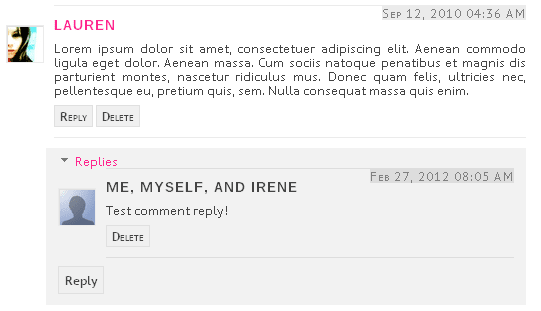
A sample comment and threaded-reply from the demonstration blog is shown in the above screen-capture.
Since their debut, share buttons have been the most requested template feature I have received by far, and Blogger's threaded comments have recently become the second most requested feature I have received. I am stoked to get both of these tasks accomplished for those that asked, whom,
I would like to add, have been
beyond patient! The new "Nymphont Style," template, and all of my planned template-updating would be impossible if it were not for your feedback, suggestions, and kindness. Thanks so much Blogger enthusiasts!
« Restructured & Redesigned Post-Footer

The pink text given the thin pink border shown in the image above depicts the default style for a Jump-Break (read more/post summary link) in the new template. Also visible in the above image, Blogger's post sharing buttons in the new "Nymphont Style" template's post-footer.
To accommodate the newly implemented Blogger share buttons and Jump-Break (Blogger's read more/post-summary link), the post-footer underwent a little restructuring. Akin to all other areas of the template, individual color options for the border and text color are provided for the Jump-Break link in the Template Designer's "Advanced," editor.
« Horizontal Nav/PageList New-Line Wrapping
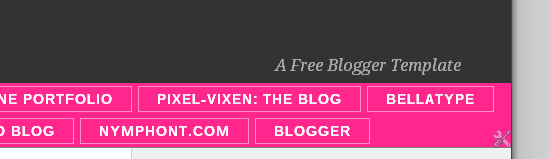
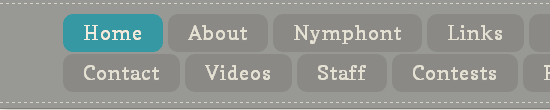
The horizontal navigation bar utilizes either a LinkList or a PageList widget to function, and accommodates more items (the links) than the previous version. Items that are unable to fit within the
first line will handsomely wrap onto and become a corresponding new-line, as the links do in the image example shown above. The new-line wrapping permits the LinkList widget or PageList widget used to accommodate lists containing only a few items or links, to those containing many.
Another improvement in the new "Nymphont Style," template has been made to the sidebar's "blog sharing icons," which are "hard-coded," into the template. Now even easier to modify, remove, or hide, these icons are located in the template code between starting caption:
<!-- NT Share Icons START -->
and ending caption:
<!-- NT Share Icons END -->
in the template code. Just below this in the template, you will also find the code for the search form.
« Blog Sharing Icons & Search Feature
Working immediately requiring no effort on the user to implement, the sidebar boasts social network icons for which to share your blog, along with a blog search utility.
To remove the sidebar's blog sharing icons, beginning with the "starting" caption, and ending after the
"ending," caption, select the text, delete it (cut it), and save the template. In their absence, the search-box will then handsomely align to the center of the column.
Additionally, the sidebar icons can be "hidden" by adding:
.share {display:none;}
to the template CSS, just above the following line:
]]></b:skin>
In the same manner the sidebar sharing icons can be removed or hidden, the search-box can also be removed by deleting it from the template code directly, or adding this line:
#searchbox {display:none;}
to the template CSS, above the following line:
]]></b:skin>
« Bold & Italic Settings for Fonts and Text
Font and text style definitions added to the "Advanced," editing options within the Template Designer allow for a much more pleasing visual to text.
Another seemingly less-conspicuous yet substantial improvement in new "Nymphont Style," template, has been the addition of Bold and Italic font definitions to the "Advanced," editor of the Template Designer.
Seemingly would be the emphatic word in there, as these new definitions allow the user to set a specific
font-face and
style to italicized text and bold text. This means, any time the user selects texts within a post to appear bold or italic, it will be styled as per their definitions set within Template Designer's "Advanced," editor.
Simply styling bold and italicized text the right fashion can have an incredible impact on the blog's typography, substantially improving it's presense and readability.
Template Basic Features
- 2 column fixed width layout, the second column allowing optional narrow-third column, all sections "widgetized" or "gadget-ready"
- 3 column footer, also "widgetized"
- Horizontal navigation utilizing either the PageList widget or a LinkList widget
- Template Designer, "Advanced," editing enabled encompassing the font and color selections for most if not all areas of the layout.
- Working immediatly, the images are included and I will continue to maintian them, however, users are advised to download the images, upload them to their own server, and then replace the image links with their own as the bandwidth could potentially be exceeded in the future. Images can be downloaded from the Nymphont Style TinyPic folder. I have written a post and created a page with specific instructions on how to replace the images in your template on the demonstration blog.
- Title setup optimized and corrected for better SEO.
- Embedded comment form below post, with threaded comments enabled to boot :D
- Functioning social network icons in the top right sidebar. Your blog's data is reflected once uploaded, so they do not require editing. These allow visitors to your blog to easily submit, share, and save your blog.
- Functioning search form for searching the blog contents.
- Wire-frame setup for easy wigetizing and adding, removing and changing gadgets
- Equipped the horizontal navigation bar with new-line wrapping, allowing for multiple lines of links / more links / longer link lists
- Blogger Jump Break / expandable post / post summary links styled and customized.
* The link back to http://www.nymFont.com must not be removed
* Do not impose charges or a fee for these templates
* Do not add links and redistribute
* Modifications allowed so long as the link back is not removed
* Do not link directly to my files, but to my template
posts to share
Special thanks to my kind visitor
MamaMona who commented with her interest in Nymphont Style hence helping it come to fruition. Thanks again to all of the sweet Blogger enthusiasts using my templates and sharing their thoughts on them. Stay tuned my friends, another updated template will be coming this way very soon. ♥
 Retrofitting the Lummoxie Template with Blogger's threaded comment system has been a few months in coming, but no one is counting, right? [Gulp] I don't want to dwell on this... To make haste as our more punctillious brethren might do, and by that I mean to get to the point, seems a bit more appropriate.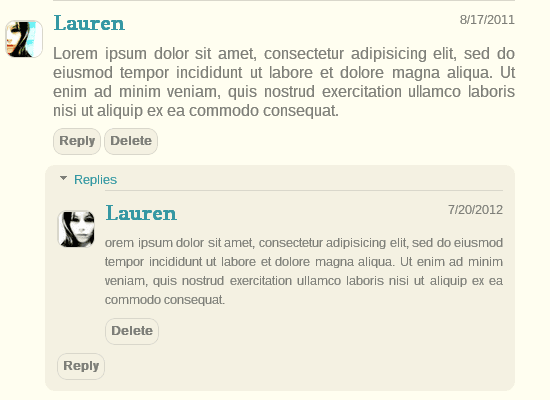



 Hot off the presses, new and improved HautePress templates are available. That's right, templates, plural. HautePress now comes in a 'sidebar right/main content left' orientation as well as the reverse.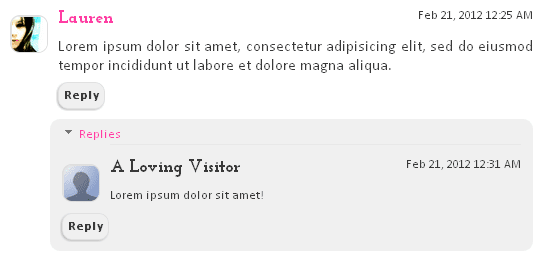
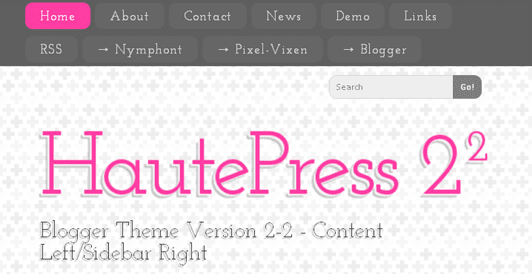


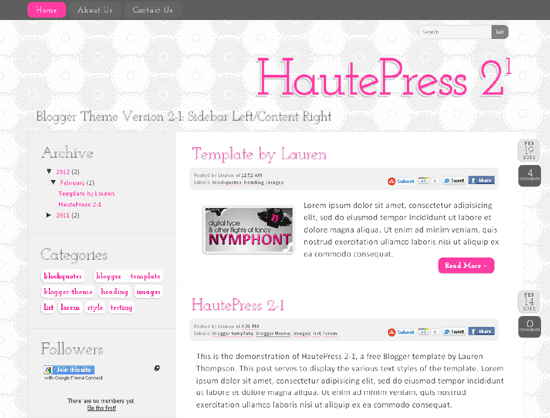

 In light of the new threaded comment system and other recent improvements made to the Blogger platform, I have been busy familiarizing myself with the new template code. My existing